
See llms.txt for all machine-readable content.

Airtable and WhatsApp Business Cloud integration

Save yourself the work of writing custom integrations for Airtable and WhatsApp Business Cloud and use n8n instead. Build adaptable and scalable Data & Storage, workflows that work with your technology stack. All within a building experience you will love.

How to connect Airtable and WhatsApp Business Cloud

Create a new workflow and add the first step

In n8n, click the "Add workflow" button in the Workflows tab to create a new workflow. Add the starting point – a trigger on when your workflow should run: an app event, a schedule, a webhook call, another workflow, an AI chat, or a manual trigger. Sometimes, the HTTP Request node might already serve as your starting point.

Airtable and WhatsApp Business Cloud integration: Create a new workflow and add the first step

Multi-platform AI sales agent with RAG, CRM logging & appointment booking

Multi-Platform AI Sales Agent with RAG, CRM Logging & Appointment Booking This workflow acts as a 24/7 sales agent, engaging leads across WhatsApp, Instagram, Facebook, Telegram, and your website. It intelligently transcribes audio messages, answers questions using a knowledge base, and uses modular sub-workflows to manage your CRM in Airtable and book appointments in Google Calendar. Who Is It For? This solution is designed for service-based businesses that require a sophisticated, multi-channel lead management and appointment booking system. Agencies, consultants, and clinics looking to automate lead qualification and booking across text and voice messages. Sales teams needing a robust system that separates CRM and calendar logic for easier management and scalability. Advanced n8n users who want a powerful, agent-based framework that can be easily customized and extended. Key Features & Workflow This system is composed of a parent workflow that orchestrates the conversation and calls specialized sub-workflows (agents) to perform specific tasks. Omni-Channel Engagement: Greets and converses with leads naturally on Website Chat, WhatsApp, Instagram, Facebook, and Telegram. Voice Message Transcription: Automatically transcribes incoming audio/voice notes from WhatsApp and Telegram into text, allowing the AI to understand and respond without manual intervention. RAG-Powered Intelligence: The AI agent draws answers from your dedicated PostgreSQL Knowledge Base (RAG), providing accurate information about your services, pricing, and process. A built-in tool allows you to load new knowledge documents from Google Drive. Modular CRM Agent (Sub-Workflow): When the conversation requires CRM actions (like creating a contact or updating an opportunity), the main agent calls a dedicated Airtable CRM sub-workflow to handle the task. Modular Calendar Agent (Sub-Workflow): To book appointments, the main agent calls a separate Google Calendar sub-workflow, which manages event creation, updates, and deletions. What You'll Need This workflow framework requires credentials for the following services: An AI provider (OpenAI is used for the main agent, transcription, and embeddings). PostgreSQL database with the pgvector extension (for RAG and chat memory). Airtable account (for the CRM sub-workflow). Google Calendar account (for the Calendar sub-workflow). Telegram Bot credentials. A Meta Developer Account (for WhatsApp, Instagram & Facebook). (Optional) Google Drive for loading knowledge documents. (Optional) Google Gemini for embeddings. How to Set It Up This is a modular system. You must set up the sub-workflows first. Deploy Sub-Workflows: Create two new, separate workflows using the provided templates for the CRM Agent and the Calendar Agent. Configure the credentials (Airtable, Google Calendar) within those workflows, then save and activate them. Link Sub-Workflows in Main Workflow: Return to this main workflow. In the "CRM Agent" and "Consultation Agent" tool nodes, select the new workflows you just created from the dropdown list. Configure Main Credentials: Securely add the remaining credentials (OpenAI, PostgreSQL, Telegram, and your Meta App) in this main workflow. Personalize the AI Agent: In the "Update Agent Details" node, fill in your business name, the agent's persona name, and your key services to customize the AI's personality. Load Your Knowledge (Optional): To populate the RAG database, use the manual trigger path starting with "When clicking ‘Execute workflow’" to download a document from Google Drive and insert it into your PostgreSQL vector store. Activate: Configure your channel-specific details (e.g., Phone Number ID in WhatsApp nodes), save the workflow, and activate it. Demo CRM Table: View on Airtable

Build your own Airtable and WhatsApp Business Cloud integration

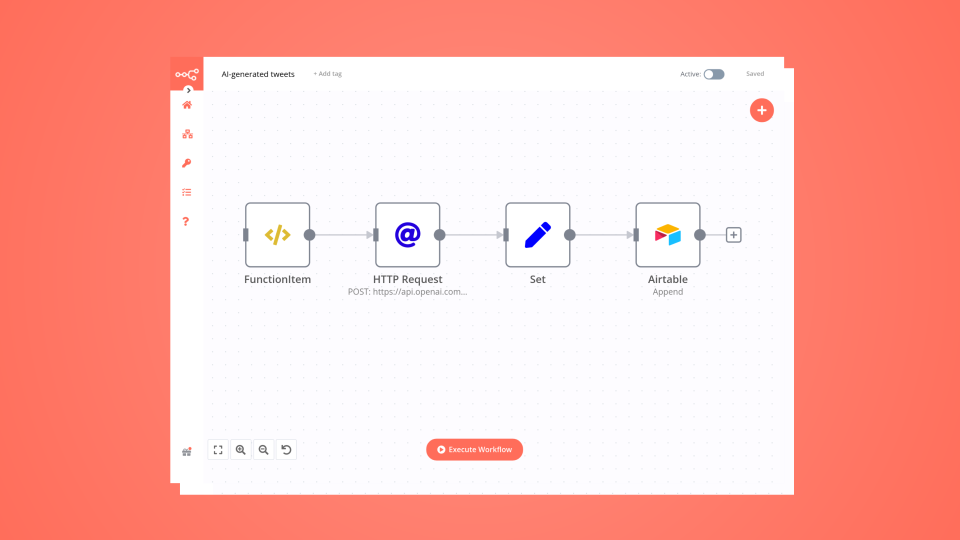
Create custom Airtable and WhatsApp Business Cloud workflows by choosing triggers and actions. Nodes come with global operations and settings, as well as app-specific parameters that can be configured. You can also use the HTTP Request node to query data from any app or service with a REST API.

Airtable supported actions

WhatsApp Business Cloud supported actions

Airtable and WhatsApp Business Cloud integration details

Airtable

Airtable is the best tool to develop your business. It helps you connect, reunite and synchronize your data and team activities, and allows you to interface with new templates and intuitive designs. It is trusted by more than 300,000 companies. With Airtable, manage everything, achieve anything, grow your business & reach the top.

WhatsApp Business Cloud

The cloud-based version of WhatsApp Business API, WhatsApp Cloud API enables companies and developers to build applications on top of WhatsApp to personalize user experiences and quickly and easily respond to customers.

FAQ about Airtable integrations

Need help setting up your Airtable and WhatsApp Business Cloud integration?

Discover our latest community's recommendations and join the discussions about Airtable and WhatsApp Business Cloud integration.

  • Erick Rdz

    Help Airtable Update Record Error with n8n

    Erick Rdz

    g the :magnifying_glass_tilted_right: search function at the upper right. If your question hasn’t been asked before, please follow the template below. Skip the questions that are not relevant to you. → Des…

    Open topic
  • Ilian

    Getting Null response with my "When executed by another workflow", any help?

    Ilian

    Describe the problem/error/question I’ve been struggling with my workflow lately. I have 2 workflow indeed (I used this template) and it appears that my 2nd workflow, which have a “When executed by another workflow” trig…

    Open topic
  • Feramuz

    Store chat messages to specific columns of Airtable Table

    Feramuz

    I want to build a conversational data collection system that automatically extracts and classifies information from chat messages into structured JSON format. When a customer provides information in natural language - fo…

    Open topic
  • Spencer Fonbuena

    Erroneous Authorization data is wrong!

    Spencer Fonbuena

    Describe the problem/error/question I’ve been using airtable to trigger some automations with the n8n webhook node. I usually send the airtable info I need from airtable automations, and attach a secret, as a small bit …

    Open topic
  • Michael Wells

    Date formatting and Airtable

    Michael Wells

    Describe the problem/error/question Hi all, I’m having a weird new issue with my Airtable step, regarding the date. As you can see [1] it’s arriving from the webhook as an ISO8601 date, but is resulting in an Airtable e…

    Open topic

Looking to integrate Slack and VirusTotal in your company?

Three colleagues talking around laptops at a shared desk

Trusted by teams building smarter workflows.

Why

Why use n8n to integrate Airtable with WhatsApp Business Cloud

Handle branching, merging and iteration easily. Pause your workflow to wait for external events.

Re-run single steps to test changes in no time. And pin your data to avoid generating trigger events every time you execute.

Your data is displayed alongside your settings, making edge cases easy to track down.

Use 1000+ workflow templates available from our core team and our community.

Copy and paste, easily import and export workflows.

Simple enough to 
understand + sophisticated 
enough to ship

Man in a brown jacket working at his desk by a window