See llms.txt for all machine-readable content.

HubSpot and Snipcart integration

Save yourself the work of writing custom integrations for HubSpot and Snipcart and use n8n instead. Build adaptable and scalable Sales, workflows that work with your technology stack. All within a building experience you will love.

How to connect HubSpot and Snipcart

Create a new workflow and add the first step

In n8n, click the "Add workflow" button in the Workflows tab to create a new workflow. Add the starting point – a trigger on when your workflow should run: an app event, a schedule, a webhook call, another workflow, an AI chat, or a manual trigger. Sometimes, the HTTP Request node might already serve as your starting point.

HubSpot and Snipcart integration: Create a new workflow and add the first step

Enrich CRM contact data with LinkedIn profiles using GPT & multi-CRM support

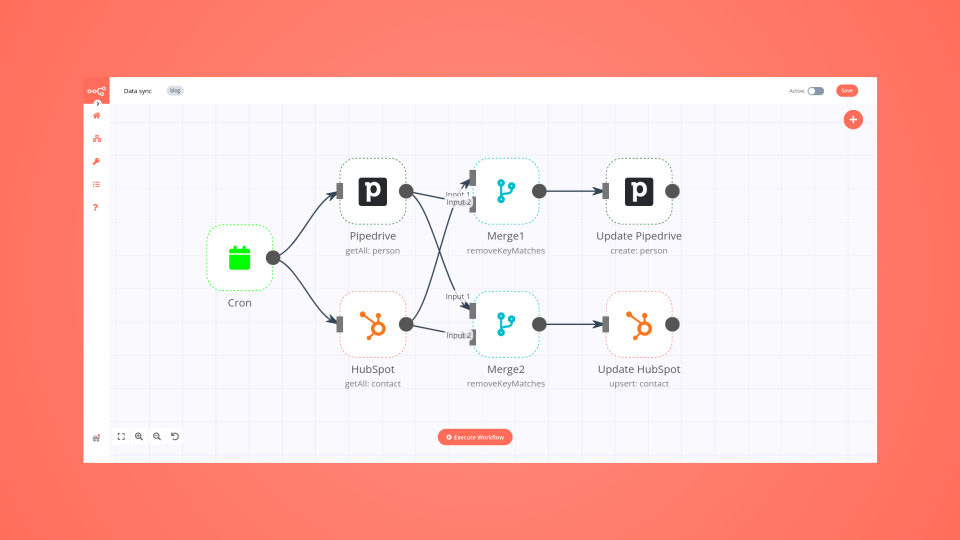
crm_enricment_n8n.png ⚠️ DISCLAIMER: This workflow uses the AnySite LinkedIn community node, which is only available on self-hosted n8n instances. It will not work on n8n.cloud. Overview This n8n workflow automates the enrichment of CRM contact data with professional insights from LinkedIn profiles. The workflow integrates with both Pipedrive and HubSpot CRMs, finding LinkedIn profiles that match your contacts and updating your CRM with valuable information about their professional background and recent activities. Key Features Multi-CRM Support: Works with both Pipedrive and HubSpot AI-Powered Data Enrichment: Uses an advanced AI agent to analyze and summarize professional information Automated Triggers: Activates when new contacts are added or when enrichment is requested Comprehensive Profile Analysis: Captures LinkedIn profile summaries and post activity How It Works Triggers The workflow activates in three scenarios: When a new contact is created in CRM When a contact is updated in CRM with an enrichment flag LinkedIn Data Collection Process Email Lookup: First tries to find the LinkedIn profile using the contact's email Advanced Search: If email lookup fails, uses name and company details to find potential matches Profile Analysis: Collects comprehensive profile information Post Analysis: Gathers and analyzes the contact's recent LinkedIn activity CRM Updates The workflow updates your CRM with: LinkedIn profile URL Professional summary (skills, experience, background) Analysis of recent LinkedIn posts and activity Setup Instructions Requirements Self-hosted n8n instance with the HDW LinkedIn community node installed API access to OpenAI (for GPT-4o) Pipedrive and/or HubSpot account AnySite API key https://AnySite.io Installation Steps Install the HDW LinkedIn Node: npm install n8n-nodes-hdw Follow the detailed instructions at: https://www.npmjs.com/package/n8n-nodes-hdw Configure Credentials: OpenAI: Add your OpenAI API key Pipedrive: Connect your Pipedrive account (if using) HubSpot: Connect your HubSpot account (if using) AnySite LinkedIn: Add your API key from https://AnySite.io CRM Custom Fields Setup: For Pipedrive: Go to Settings → Data Fields → Contact Fields → + Add Field Create the following custom fields: LinkedIn Profile: Field type - Large text Profile Summary: Field type - Large text LinkedIn Posts Summary: Field type - Large text Need Enrichment: Field type - Single option (Yes/No) Detailed instructions for creating custom fields in Pipedrive: https://support.pipedrive.com/en/article/custom-fields For HubSpot: Go to Settings → Properties → Create property Create the following properties for Contact object: linkedin_url: Field type - Single-line text profile_summary: Field type - Multi-line text linkedin_posts_summary: Field type - Multi-line text need_enrichment: Field type - Checkbox (Boolean) Detailed instructions for creating properties in HubSpot: https://knowledge.hubspot.com/properties/create-and-edit-properties Import the Workflow: Import the "HDW_CRM_Enrichment.json" file into your n8n instance Activate Webhooks: Enable the webhook triggers for your CRM to ensure the workflow activates correctly Customization Options AI Agent Prompts You can modify the system prompts in the "Data Enrichment AI Agent" nodes to: Change the focus of profile analysis Adjust the tone and detail level of summaries Customize what information is extracted from posts CRM Field Mapping The workflow is pre-configured to update specific custom fields in Pipedrive and HubSpot. Update the field/property mappings in: "Update data in Pipedrive" nodes "Update data in HubSpot" node Troubleshooting Common Issues LinkedIn Profile Not Found: Check if the contact's email is their work email; consider adjusting the search parameters Webhook Not Triggering: Verify webhook configuration in your CRM Missing Custom Fields: Ensure all required custom fields are created in your CRM with correct names Rate Limits Be aware of LinkedIn API rate limits (managed by AnySite LinkedIn node) Consider implementing delays if processing large batches of contacts Best Practices Use enrichment flags to selectively update contacts rather than enriching all contacts Review and clean contact data in your CRM before enrichment Periodically review the AI-generated summaries to ensure quality and relevance

Popular ways to use the HubSpot and Snipcart integration

Build your own HubSpot and Snipcart integration

Create custom HubSpot and Snipcart workflows by choosing triggers and actions. Nodes come with global operations and settings, as well as app-specific parameters that can be configured. You can also use the HTTP Request node to query data from any app or service with a REST API.

HubSpot supported actions

Supported methods for Snipcart

Delete
Get
Head
Options
Patch
Post
Put

To set up Snipcart integration, add the HTTP Request node to your workflow canvas and authenticate it using a generic authentication method. The HTTP Request node makes custom API calls to Snipcart to query the data you need using the API endpoint URLs you provide.

Requires additional credentials set up

Use n8n's HTTP Request node with a predefined or generic credential type to make custom API calls.

HubSpot and Snipcart integration details

HubSpot

HubSpot is a leading all-in-one marketing and sales software that is tailored for content marketing, SEO, landing pages, lead management, marketing automation and more. It is easy to use, and can help you have a clear view of your entire sales cycle.

Snipcart

Snipcart is an e-commerce platform that allows developers to easily add customizable shopping cart functionalities to websites using simple HTML and JavaScript, without the need for backend integration. It provides a seamless and hassle-free solution for building online stores.

Other integrations with HubSpot and Snipcart

Supercharge your CRM

Need a more powerful integration with your CRM? n8n lets you go beyond standard integrations offered by popular CRMs!

Learn more

FAQ about HubSpot integrations

Need help setting up your HubSpot and Snipcart integration?

Discover our latest community's recommendations and join the discussions about HubSpot and Snipcart integration.

  • Jonas Wagner

    How can I edit the subscription type a contact is subscribed to?

    Jonas Wagner

    Hi, I am new here :smiley: I have a Notion form for interested contacts to subscribe to my hubspot newsletter. How can I change the subscription of a contact when he fills the form and a new contact is created in Hubsp…

    Open topic

Looking to integrate Slack and VirusTotal in your company?

Three colleagues talking around laptops at a shared desk

Trusted by teams building smarter workflows.

Why

Why use n8n to integrate HubSpot with Snipcart

Handle branching, merging and iteration easily. Pause your workflow to wait for external events.

Re-run single steps to test changes in no time. And pin your data to avoid generating trigger events every time you execute.

Your data is displayed alongside your settings, making edge cases easy to track down.

Use 1000+ workflow templates available from our core team and our community.

Copy and paste, easily import and export workflows.

Simple enough to 
understand + sophisticated 
enough to ship

Man in a brown jacket working at his desk by a window