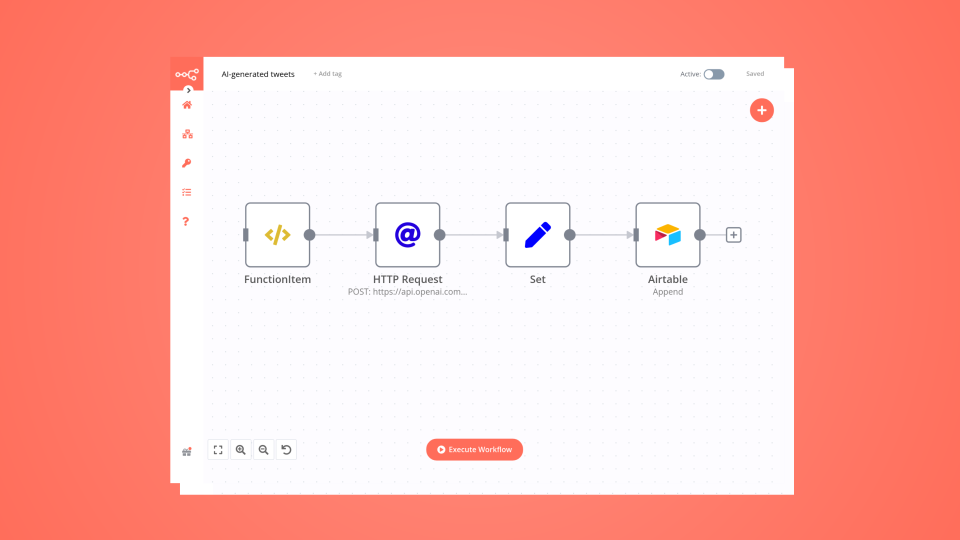
Save yourself the work of writing custom integrations for Microsoft Teams Admin and OpenAI and use n8n instead. Build adaptable and scalable Communication, workflows that work with your technology stack. All within a building experience you will love.
In n8n, click the "Add workflow" button in the Workflows tab to create a new workflow. Add the starting point – a trigger on when your workflow should run: an app event, a schedule, a webhook call, another workflow, an AI chat, or a manual trigger. Sometimes, the HTTP Request node might already serve as your starting point.
Build your own Microsoft Teams Admin and OpenAI integration
Create custom Microsoft Teams Admin and OpenAI workflows by choosing triggers and actions. Nodes come with global operations and settings, as well as app-specific parameters that can be configured. You can also use the HTTP Request node to query data from any app or service with a REST API.
Supported API Endpoints for Microsoft Teams Admin
POST
Create team
Allows you to create a new team in Microsoft Teams.
/v1.0/teams
GET
List teams
Retrieves a list of all teams that the user is a member of.
/v1.0/me/joinedTeams
DELETE
Remove member
Remove a member from a team.
/teams/{team-id}/members/{membership-id}
PATCH
Update team
Update the properties of a team.
/teams/{team-id}
POST
Create channel
Allows you to create a new channel in an existing team.
/v1.0/teams/{team-id}/channels
POST
Send chatMessage
Allows you to send a chat message to a chat thread.
/v1.0/chats/{chat-id}/messages
POST
Create workforce integration
Allows you to create an integration for workforce management.
Retrieve the properties and relationships of an onlineMeeting object.
/v1.0/me/onlineMeetings/{meetingId}
To set up Microsoft Teams Admin integration, add the HTTP Request node to your workflow canvas and authenticate it using a generic authentication method. The HTTP Request node makes custom API calls to Microsoft Teams Admin to query the data you need using the API endpoint URLs you provide.
n8n AI workflow transforms web scraping into an intelligent, AI-powered knowledge extraction system that uses vector embeddings to semantically analyze, chunk, store, and retrieve the most relevant API documentation from web pages. Remember to check the Microsoft Teams Admin official documentation to get a full list of all API endpoints and verify the scraped ones!
Generate a model response with GPT 3, 4, 5, etc. using Responses API
Classify Text for Violations
Check whether content complies with usage policies
Analyze Image
Take in images and answer questions about them
Generate an Image
Creates an image from a text prompt
Edit Image
Edit an image
Generate Audio
Creates audio from a text prompt
Transcribe a Recording
Transcribes audio into text
Translate a Recording
Translates audio into text in English
Delete a File
Delete a file from the server
List Files
Returns a list of files that belong to the user's organization
Upload a File
Upload a file that can be used across various endpoints
Create
Create a conversation
Get
Get a conversation
Remove
Remove a conversation
Update
Update a conversation
Generate
Creates a video from a text prompt
Microsoft Teams Admin and OpenAI integration details
Microsoft Teams Admin is a management platform that enables administrators to oversee and customize various settings within the Microsoft Teams application. It allows them to control user access, configure security settings, manage apps, and monitor usage and analytics.
OpenAI, the creator of ChatGPT, offers a range of powerful models including GPT-3, DALL·E, and Whisper. Leverage these models to build AI-powered workflows.
Yes, Microsoft Teams Admin can connect with OpenAI using n8n.io. With n8n, you can create workflows that automate tasks and transfer data between Microsoft Teams Admin and OpenAI. Configure nodes for Microsoft Teams Admin and OpenAI in the n8n interface, specifying actions and triggers to set up their connection.
Yes, with n8n, you can programmatically interact with Microsoft Teams Admin’s API via pre-defined supported actions or raw HTTP requests. With the HTTP Request node, you create a REST API call. You need to understand basic API terminology and concepts.
Yes, with n8n, you can programmatically interact with OpenAI’s API via pre-defined supported actions or raw HTTP requests. With the HTTP Request node, you create a REST API call. You need to understand basic API terminology and concepts.
Yes, it is safe to use n8n to integrate Microsoft Teams Admin and OpenAI. n8n offers various features to ensure the safe handling of your data. These include encrypted data transfers, secure credential storage, RBAC functionality, and compliance with industry-standard security practices (SOC2 compliant). For hosted plans, data is stored within the EU on servers located in Frankfurt, Germany. You can also host it on your own infrastructure for added control.
To start integrating Microsoft Teams Admin and OpenAI in n8n, you have different options depending on how you intend to use it:
n8n Cloud: hosted solution, no need to install anything.
Self-host: recommended method for full-control or customized use cases.
Unlike other platforms that charge per operation, step, or task, n8n charges only for full workflow executions. This approach guarantees predictable costs and scalability, no matter the complexity or volume of your workflows.
Need help setting up your Microsoft Teams Admin and OpenAI integration?
Discover our latest community's recommendations and join the discussions about Microsoft Teams Admin and OpenAI integration.
How to define AI-powered Extra Workflow Inputs in AI tools?
·Artem
Describe the question
I need to pass to the tool some data from the AI Agent. Like, “task name” and “task tags” to create a task via Custom Workflow Tool.
So I don’t know what to refer to in the Extra Inputs. Because th…
Hello! My goal is to use Google Forms to collect information from my clients and then use n8n to automate the processing of this information.
My workflow involves:
Collecting data through Google Forms.
Using n8n to re…
How to handle multi-message prompts in OpenAI Chat node?
·Heisenbug
Describe the problem/error/question
I want to send multiple messages to the OpenAI Chat node (LangChain → LLM Prompt Template) in a single execution, simulating a conversation. The first message is fixed, and the followi…
Is it possible to choose the Responses API or OpenAI ?
It has been updated a few months ago by OpenAI, but the node still seems to be using the old Completions API. [https://platform.openai.com/docs/guides/migrate-to-re…
OpenAI not receicving JSON data from previous node
·Andrew adawdad
Describe the problem/error/question
Im currently using the openAI node to send a text message to the system. I am sending the previous nodes JSON data, but the openai response says that im only sending {{ $json }} instea…