See llms.txt for all machine-readable content.

Pipedrive and WOXO integration

Save yourself the work of writing custom integrations for Pipedrive and WOXO and use n8n instead. Build adaptable and scalable Sales, workflows that work with your technology stack. All within a building experience you will love.

How to connect Pipedrive and WOXO

Create a new workflow and add the first step

In n8n, click the "Add workflow" button in the Workflows tab to create a new workflow. Add the starting point – a trigger on when your workflow should run: an app event, a schedule, a webhook call, another workflow, an AI chat, or a manual trigger. Sometimes, the HTTP Request node might already serve as your starting point.

Pipedrive and WOXO integration: Create a new workflow and add the first step

Sync leads from Webflow to Pipedrive CRM using n8n

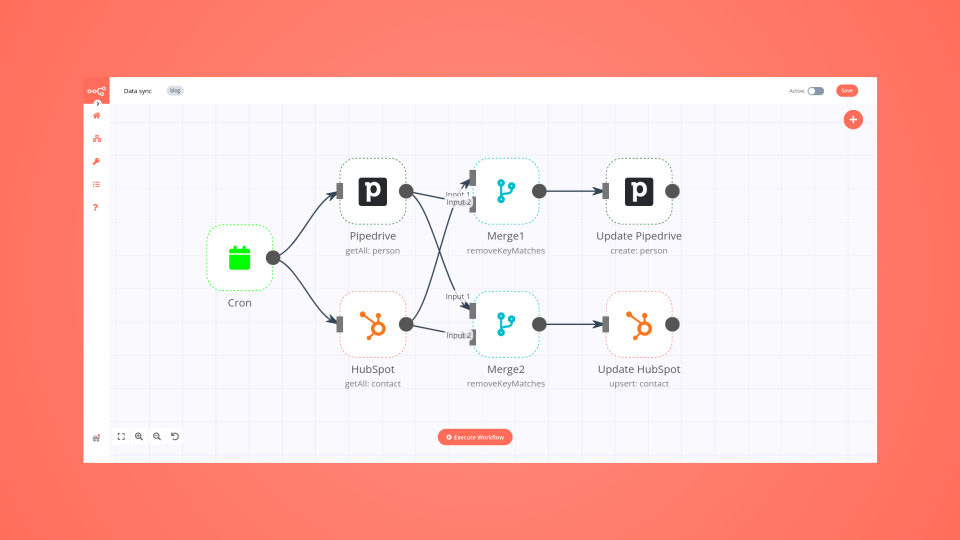
This n8n template automates the process of capturing leads from Webflow form submissions and syncing them with your Pipedrive CRM. It ensures that each submission is accurately associated with the correct organization and contact in Pipedrive, streamlining lead management and minimizing duplicates. Use cases include: Sales teams that want to automate CRM data entry, marketing teams capturing qualified leads from landing pages, or any business looking to improve their Webflow-to-CRM integration workflow. Good to know The workflow assumes that Webflow form submissions include the lead’s email address. The domain is extracted from the email to match or create the organization in Pipedrive. This template does not handle lead scoring or enrichment, but can be extended for such use-cases. How it works Extract website from email The email is split to extract the domain (e.g., jane@company.com → company.com), which is used to search for existing organizations. Check if the organization exists The Pipedrive API is queried using the domain. If the organization exists, we proceed. If not, a new organization is created. Check if the person exists -- If the person already exists in Pipedrive, a note is added to their activities to log the form submission. -- If the person does not exist, a new person is created, a note is added to the person, and a new lead is created. (Optional) Add your own actions You can extend this workflow to trigger Slack notifications, email follow-ups, or internal dashboards. How to use Start with the manual trigger node, or replace it with a webhook to connect directly to Webflow form submissions in real-time. Requirements Webflow form integration (via webhook or other method) Pipedrive account and API key Customising this workflow You can add enrichment services to auto-fill job titles or LinkedIn profiles. Perfect for growing sales pipelines without manual CRM input.

Build your own Pipedrive and WOXO integration

Create custom Pipedrive and WOXO workflows by choosing triggers and actions. Nodes come with global operations and settings, as well as app-specific parameters that can be configured. You can also use the HTTP Request node to query data from any app or service with a REST API.

Pipedrive supported actions

Supported methods for WOXO

Delete
Get
Head
Options
Patch
Post
Put

To set up WOXO integration, add the HTTP Request node to your workflow canvas and authenticate it using a generic authentication method. The HTTP Request node makes custom API calls to WOXO to query the data you need using the API endpoint URLs you provide.

Requires additional credentials set up

Use n8n's HTTP Request node with a predefined or generic credential type to make custom API calls.

Pipedrive and WOXO integration details

Pipedrive

Pipedrive is a sales-focused Customer Relationship Management tool that teams of all sizes love using. At the core of Pipedrive is pipeline management, and it features key sales functionalities: automations, email integration and a decent selection of partner integrations.

WOXO

WOXO enables your team to work together on video editing and creation within a spreadsheet, resulting in the rapid generation of dynamic videos at scale in just a matter of minutes.

Other integrations with Pipedrive and WOXO

Supercharge your CRM

Need a more powerful integration with your CRM? n8n lets you go beyond standard integrations offered by popular CRMs!

Learn more

Automate lead management

Using too many marketing tools? n8n lets you orchestrate all your apps into one cohesive, automated workflow.

Learn more

FAQ about Pipedrive integrations

Looking to integrate Slack and VirusTotal in your company?

Three colleagues talking around laptops at a shared desk

Trusted by teams building smarter workflows.

Why

Why use n8n to integrate Pipedrive with WOXO

Handle branching, merging and iteration easily. Pause your workflow to wait for external events.

Re-run single steps to test changes in no time. And pin your data to avoid generating trigger events every time you execute.

Your data is displayed alongside your settings, making edge cases easy to track down.

Use 1000+ workflow templates available from our core team and our community.

Copy and paste, easily import and export workflows.

Simple enough to 
understand + sophisticated 
enough to ship

Man in a brown jacket working at his desk by a window