Back to Templates


Description
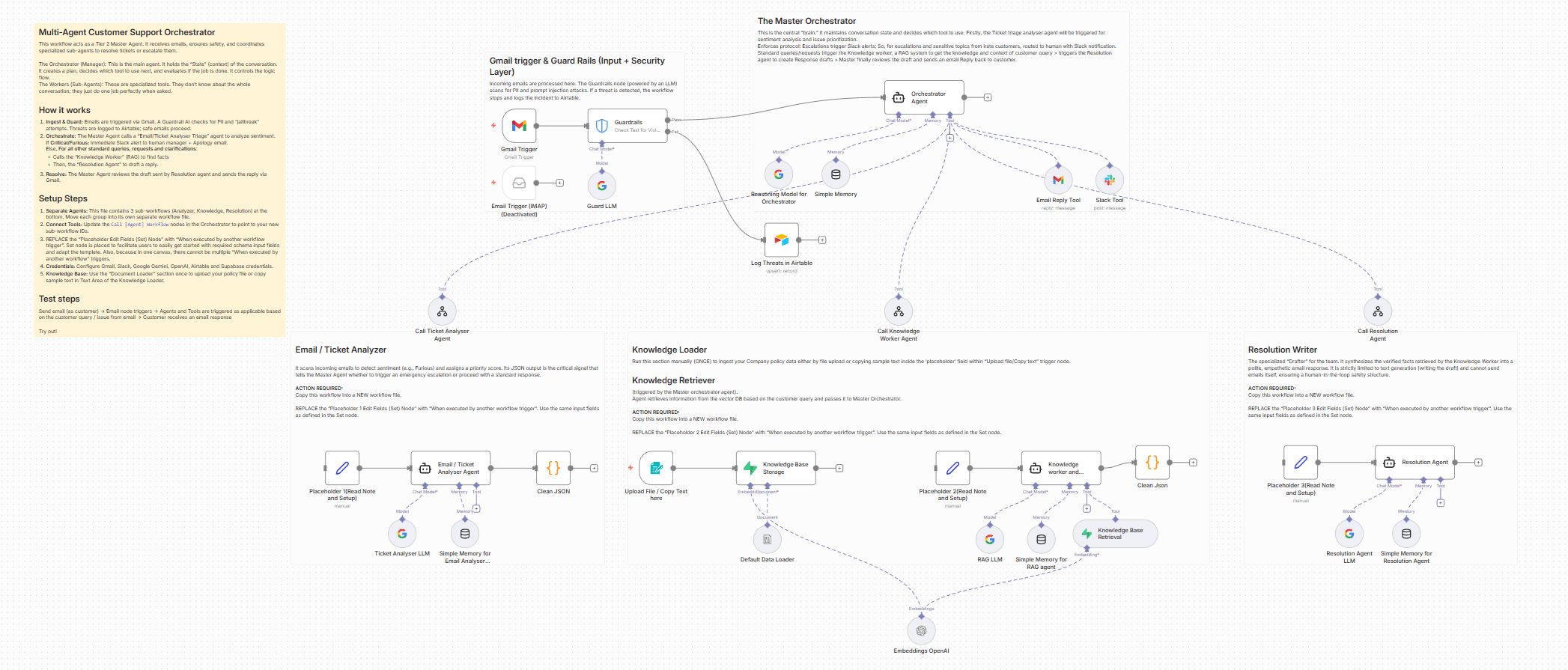
This workflow acts as an autonomous Tier 2 Customer Support Agent. It doesn't just answer questions; it manages the entire lifecycle of a support ticket—from triage to resolution with Guardrails to deal with prompt injections, PII information blocking, etc. enabling such threats are blocked and logged in Airtable.
Unlike standard auto-responders, this system uses a "Master Orchestrator" architecture to coordinate specialized sub-agents. It creates a safe, human-like support experience by combining RAG (Knowledge Base retrieval) with a safety-first state machine.
How it works
The workflow operates on a strict "Hub and Spoke" model managed by a Master Orchestrator:
-
Security Guardrails (The Gatekeeper) Before the AI even sees the message, a hard-coded security layer scans for Prompt Injection attacks, Profanity, and PII. If a threat is detected, the workflow locks down, logs the incident to Airtable, and stops execution immediately.
-
Orchestration & Triage Once the message passes safety checks, the Master Orchestrator takes over. Its first action is to call the Ticket Analyser Agent.
-
Analysis & Scoring The Ticket Analyser classifies the issue (e.g., "Technical," "Billing") and scores the customer's sentiment. It returns a priority_score to the Master Orchestrator.
-
The Decision Logic (Circuit Breaker) The Master Orchestrator evaluates the score:
Escalation: If the customer is "Furious" or the score is high, it bypasses AI drafting and immediately alerts a human manager via Slack.
Resolution Path: If the request is standard, it proceeds to the next steps.
-
Knowledge Retrieval (RAG) The Orchestrator calls the Knowledge Worker Agent. This agent searches your Supabase vector store to find specific, verified company policies or troubleshooting steps relevant to the user's issue.
-
Resolution Drafting Armed with the analysis and the retrieved facts, the Orchestrator calls the Resolution Agent. This agent synthesizes a polite, professional email draft.
-
Final Execution The Master Orchestrator reviews the final draft and sends the email via Gmail.
Set up
This is multi-agent system. Please follow these steps to configure the environment:
⚠️ IMPORTANT: This template contains the Main Orchestrator AND the Sub-Agents in a single view. You must separate them for the system to function:
Separate the Agents: Copy the nodes for each sub-agent (Ticket Analyser, Knowledge Worker, Resolution Agent) into their own new workflows.
Link the Tools: In the Main Orchestrator workflow, open the "Call [Agent Name]" tool nodes and update the Workflow ID to point to the new workflows you just created.
Configure Credentials: You will need credentials for Gmail (or your preferred email provider), Slack, Airtable, Supabase (for the vector store), and Google Gemini (or OpenAI).
Initialize the Knowledge Base:
Open the "One time Document Loader" section in the workflow.
Upload your policy document (PDF/Text) to the "Upload your file here" node.
Run this branch once to vectorize your documents into Supabase.
Setup Airtable: Create a simple table with columns for Sender Email, Incident Type, and Flagged Content to log security threats caught by the guardrails.
Customize the Trigger: Update the Gmail Trigger node to watch for your specific support alias (e.g., support@yourdomain.com) and ensure it only picks up "Unread" emails.
Adjust the Escalation Sensitivity: In the Orchestrator Agent node, you can tweak the "Phase 2" logic to change what triggers a human hand-off (currently set to priority_score >= 0.9).
Good to go!