Back to Templates


⚠️ Notice:
This workflow uses the CustomJS JSON to TOON node from CustomJS, which requires a self-hosted n8n instance and a CustomJS API key.
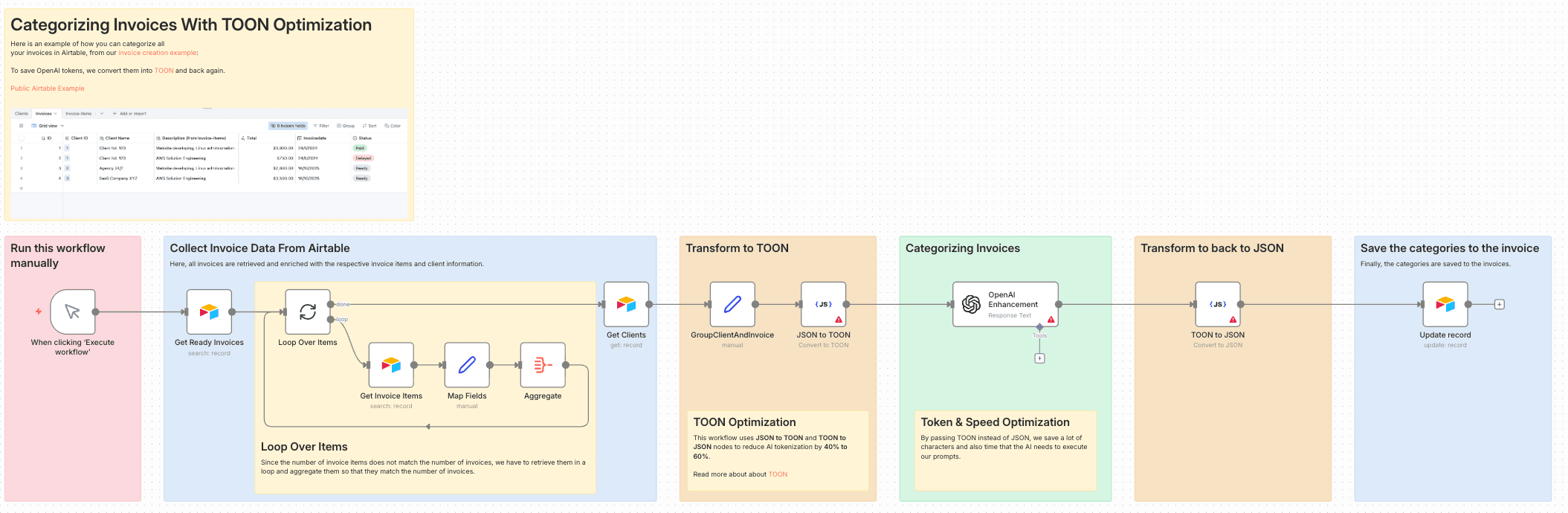
This workflow demonstrates how to automatically categorize invoices from Airtable using OpenAI, while significantly reducing token usage by converting structured data into TOON (Token-Optimized Object Notation) before sending it to the LLM.
Instead of passing large, nested JSON payloads (clients, invoices, invoice items) directly to OpenAI, the workflow converts the data into TOON, lets the AI focus purely on semantic classification, and then converts the result back into clean JSON that can safely be written back to Airtable.
The result is a reliable, cost-efficient, and production-ready invoice categorization pipeline.
Why This Workflow?
Categorizing invoices based on free-text invoice items is a perfect AI use case — but sending raw JSON to LLMs is:
- expensive
- slow
- error-prone (broken JSON, hallucinated fields)
This workflow applies the TOON pattern, reducing token usage by 40–60%, while ensuring the AI only returns exactly the data you expect.
The LLM never sees raw JSON syntax — only a compact, schema-preserving representation.
What This Workflow Does
- Fetches Invoices, Invoice Items, and Clients from Airtable
- Aggregates invoice items per invoice
- Converts the structured data into TOON
- Uses OpenAI to assign exactly one category per invoice
- Converts the AI result back into JSON
- Writes the category back to Airtable
All without manual intervention.
Key Features
-
AI-based Invoice Categorization
Automatically classify invoices (e.g.web_development,system_administration) -
TOON Token Optimization
Reduce OpenAI token usage by 40–60% -
Schema Safety
AI never breaks your JSON structure -
Deterministic Output
One category per invoice, enforced by prompt design -
Airtable-Native
Reads from and writes directly back to Airtable
How It Works
-
Manual Trigger
Run the workflow on demand -
Load Data from Airtable
- Fetch ready invoices
- Resolve related clients
- Fetch and aggregate invoice items
-
Prepare Structured Context
Group client, invoice, and invoice items into a single object -
JSON → TOON
Convert structured data into token-efficient TOON -
AI Categorization
- OpenAI receives TOON data
- Assigns exactly one category per invoice
- Returns only TOON (no JSON, no prose)
-
TOON → JSON
Convert AI output back into valid JSON -
Persist Result
Update the invoice category field in Airtable